
PHP intl-Extension Error for Laravel on Windows
Fixing the “intl” PHP Extension Error for Laravel on Windows
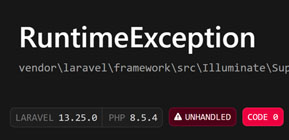
When spinning up a fresh Laravel project on a local Windows and Apache environment, you might hit a frustrating runtime blocker:
vendor\laravel\framework\src\Illuminate\Support\Number.php:476
The “intl” PHP extension is required to use the [format] method.
Even if you have uncommented the extension inside your php.ini file, Apache on Windows often fails to load it due to how background services resolve binary system paths and compiled runtime dependencies.
Here are the exact steps to permanently resolve the issue.
Step 1: Add PHP to the System Path Environment Variables
When Apache runs as a background Windows service, it operates under a restricted system context. Unlike your local user terminal, the background service cannot read user-level environment variables. If your PHP directory isn’t explicitly defined in the machine’s global system path, Apache cannot trace supporting DLL files.
- Press the Windows Key, type Environment Variables, and select Edit the system environment variables.
- Click the Environment Variables… button.
- Under the bottom box labeled System variables, find and select the variable named
Path, then click Edit. - Click New and add your absolute PHP directory path (e.g.,
C:\php854_full). - Click OK on all open dialog boxes to save changes.
Step 2: Copy ICU Runtime Dependencies Directly Into Apache’s Bin Directory
Extensions like php_intl.dll are not self-contained; they rely heavily on external ICU runtime library files (such as icudt*.dll, icuin*.dll, and icuuc*.dll) to process localization rules. If Apache fails to trace these binaries during initialization, it aborts loading the module.
- Navigate to your main PHP installation folder (e.g.,
C:\php854_full). - Locate all files starting with
icu. - Copy these files and paste them directly into your Apache binary directory:
C:\Apache24\bin\.
Step 3: Perform a Full Service Restart
Because Apache runs as a persistent service, quick reloads or terminal shortcuts can keep cached worker threads alive in memory.
- Open your Windows Services manager by pressing
Win + R, typingservices.msc, and hitting Enter. - Locate your Apache service instance (e.g.,
Apache2.4). - Right-click the service and select Restart (or stop it completely, wait 3 seconds, and start it back up).
With your global system environment configuration updated and core ICU binaries sitting directly inside Apache’s binary workspace, Laravel will boot cleanly with full support for formatting and localization classes.
Join the Newsletter
Sign up for our personalized daily newsletter

#1 GUIDE TO DRUPAL, WORDPRESS, CSS AND CUSTOM CODING | BEGINNER TO PRO



Leave a Reply